CANCEL BUTTON IN THE ONLINE STORE
May 29, 2026

Starting June 19, 2026, every online store will need a cancellation button. How we implemented this feature for Bastuck ‒ and why it’s more than just a button.
Cancellation with a Click: How We Implemented the Cancellation Button for Bastuck
Starting June 19, 2026, every online store that sells to consumers must offer a digital cancellation feature. Bastuck has had this feature live since May. Here’s what’s behind it ‒ and why the button is the easiest part of it all.
The Cut-off Date
The idea behind the new regulation is simple: A contract that can be concluded with two clicks should also be able to be canceled with two clicks. The 14-day right of withdrawal itself remains unchanged. What’s new is the process for exercising it.
This applies to distance sales contracts for goods, services, and financial services concluded with consumers via websites and mobile apps ‒ regardless of the company’s size, revenue, or legal form. The only exception is purely business-to-business transactions. The requirement takes effect on June 19, 2026.
Violations are subject to fines: up to four percent of annual revenue for companies with more than 1.25 million euros in annual revenue, and up to 50,000 euros for smaller companies. This is not an area where one can hope for leniency.
Why It's Not a Button, but Three Building Blocks
“We need a button” was also the first phrase in our ticket. Upon closer inspection, the feature consists of three parts that must work together:
The button Clearly
labeled, for example, “Cancel Contract.” Visually highlighted, accessible on the main page, and clearly distinguished from the Terms and Conditions, Legal Notice, and Privacy Policy. It must be permanently available—not just when a cancellation period is currently in effect.
The confirmation page
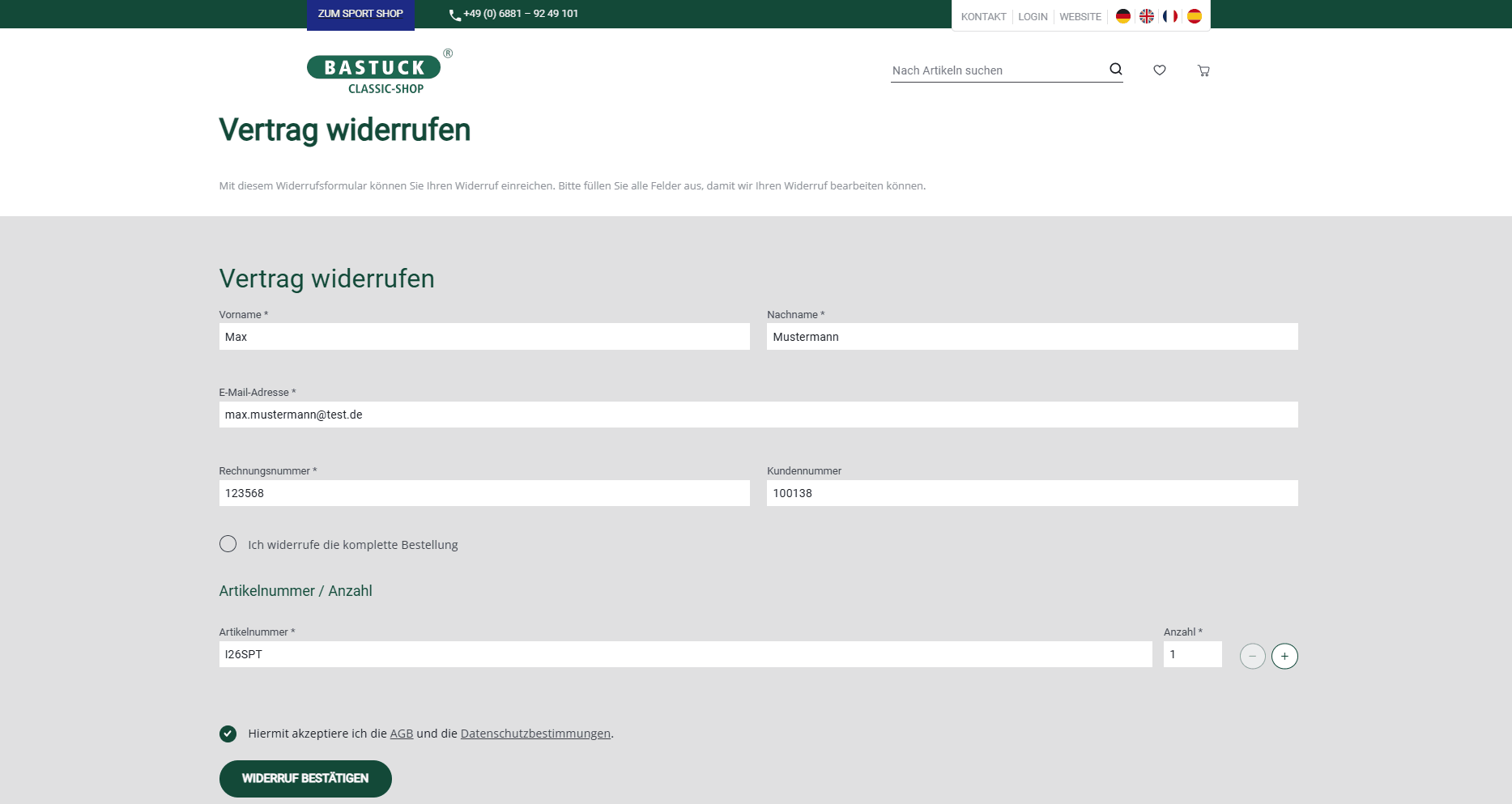
Clicking the button leads to a separate page, similar to the familiar cancellation button. There, the information needed to associate the cancellation with a specific contract is entered: name, a contract or order number, and the address where the confirmation of receipt should be sent. Only a second button triggers the cancellation. If an order includes multiple items, it must be possible to specify exactly which items are being canceled.
The confirmation of receipt
Automated, usually via email, containing the text of the declaration as well as the date and time of receipt. This is the element that transforms a form page into a system: it must be logged, delivered, and verifiable.
The point where things get technically tricky
One point took the most back-and-forth discussion: The cancellation feature must always be accessible even without logging in.
It applies to registered customers as well as guest orders. This rules out the most convenient option. You can’t simply place the cancellation option in the customer portal, where the order is already known. Instead, an anonymous request with minimal information must be matched to an actual contract ‒ without creating a security loophole that would allow third parties to access data using guessed order numbers.
Our approach at Bastuck: The request is sent to Bastuck, and the customer receives a notification. The basic rule we’ve followed is that the form always displays the same message after submission. Only those with access to the designated mailbox can determine whether an order was found.
Implementation in the Store
The Bastuck Shop combines a Vue Storefront front end with a Django back end and is integrated with the inventory management system. Specifically, for the cancellation button, this meant:
- Front end: a central cancellation form with a confirmation page
- Backend: validation of the information, logging, and sending the confirmatio
The last point was the most important to us. A cancellation that is correctly confirmed but then gets lost internally in a general inbox may comply with the regulations, but it still frustrates everyone involved. The real work begins after the click: return shipping, refunds, and inventory management. Total time required: about twelve hours. We finished on May 29, 2026 ‒ a few weeks before the deadline.
What Else Is Included
Two things are often overlooked because they are not technical in nature:
- The cancellation policy must be updated because users must be informed about the new feature. The legislature is updating the model policy accordingly.
- The privacy policy needs a section explaining what data is processed during the withdrawal process and how long it is stored.
Neither of these is part of the development process, but they should be included in the same timeline.
Conclusion
The "Cancel" button is a manageable task ‒ if you start early enough. If you find that your store doesn’t allow for this functionality without logging in, you don’t have a front-end problem ‒ you have a data model problem.
And that’s not something you can solve in two weeks. Do you run a store and still need to address this issue? Get in touch ‒ we’ll take a look at what your existing architecture already offers and what’s missing.
More on the cancellation button: IHK article
E-commerce
Bastuck
Cancel button
Withdrawal
Law
Consumer Protection
Online Store
Interfaces
Django
Vue Storefront

René Krause
[email protected]